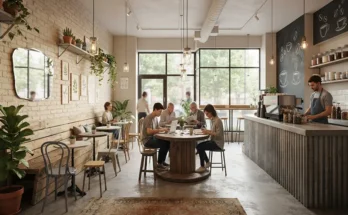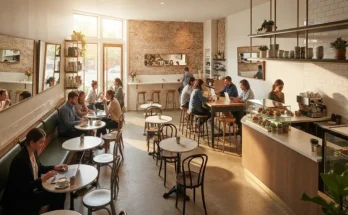
The modern professional landscape has changed permanently. With millions of freelancers, entrepreneurs, and remote workers untethered from traditional office cubicles, the local coffee shop has evolved into the ultimate “third space.”
However, for independent cafe owners and interior designers, catering to laptop users often sparks a contentious debate: How do you welcome remote workers who want to camp out for hours without sacrificing table turnover, hourly revenue, and profitability?
The answer is not banning laptops; it is intentional design. By creating a spatial ecosystem specifically engineered for remote workers, you can capture this lucrative crowd, build fierce customer loyalty, and protect your bottom line. Here is how to design a work-friendly cafe that balances productivity with hospitality.
The Economics of the Laptop Crowd
Many cafe operators fear the “squatter customer”—the person who buys a single drip coffee and occupies a four-top table for five hours straight.
- Reframing the Customer: Remote workers are rarely one-time visitors; they are high-frequency regulars who return week after week, often purchasing a second coffee, a pastry, or a lunch sandwich during their stay.
- Smart Zoning Solutions: Instead of fighting the laptop crowd, embrace them by design. Create dedicated work zones where their presence makes economic sense, while reserving other areas for quick-service catch-ups and fast table turns.
Strategy 1: Power Infrastructure and Cable Management
The number one reason remote workers scout a specific cafe is simple: accessible power. If your outlets require crawling under furniture or running extension cords across walkways, you have already lost them.
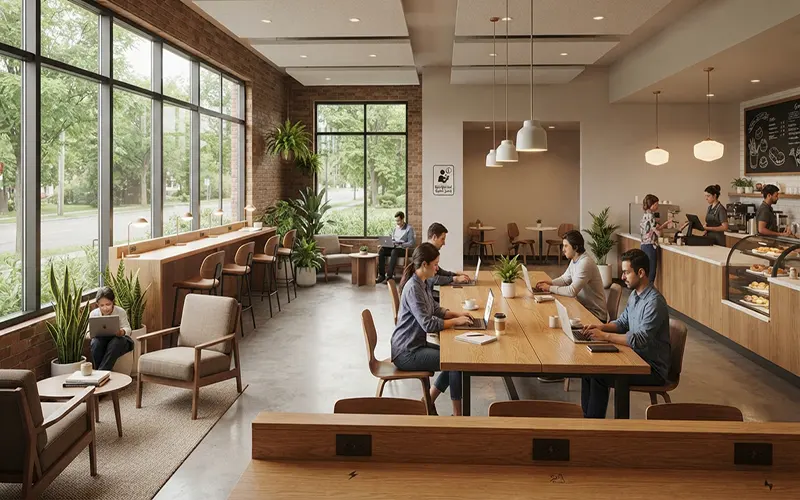
- Integrated Power Solutions: Build electrical outlets and USB-C fast-charging ports directly into communal tables, banquette bases, and custom perimeter counters.
- Eliminating Tripping Hazards: Work with a licensed electrician to install discreet pop-up floor boxes or wall-mounted tracks. Never let loose extension cords snake across walking paths where staff and customers can trip.
Strategy 2: Ergonomic Seating Zones vs. Lounge Areas
Remote workers come with varying needs—some need deep-focus desk setups, while others want a casual spot to answer emails. Diversify your seating typologies:
- The Communal Work Table: Feature a large, solid-timber communal table at standard desk height (around 30 inches) paired with comfortable, supportive chairs rather than low, backless stools. This maximizes seating capacity per square foot.
- Acoustic Work Booths: Install semi-private high-backed acoustic booths along a perimeter wall. These provide a cocoon-like environment for video calls and deep concentration without requiring an entirely separate room.
- Separating Lounge from Labor: Keep soft leather armchairs and low coffee tables away from work zones. Designate them strictly for casual reading and socializing to prevent neck strain and discourage multi-hour laptop camping on low furniture.
Strategy 3: Acoustic Engineering and Lighting for Focus
A cafe designed for work requires a delicate acoustic balance. You want the lively energy of a coffee shop, but not a deafening echo chamber.
- Managing Ambient Noise: Blend espresso machine sounds and low-level background music with sound-absorbing materials. Use acoustic ceiling baffles, wood-slat wall panels, and upholstered banquettes to soak up harsh sound frequencies.
- Glare-Free Task Lighting: Screen glare is a remote worker’s enemy. Avoid harsh, blinding overhead downlights. Instead, opt for diffused, adjustable lighting fixtures (sitting in the warm-to-neutral 3000K–4000K color temperature range) that illuminate work surfaces evenly without washing out computer screens.
Strategy 4: High-Speed Connectivity and Digital Infrastructure
Wi-Fi is no longer an amenity; it is a primary utility. If your internet drops, your remote customers pack up instantly.
- Enterprise-Grade Networks: Invest in a commercial-grade router with dedicated bandwidth management (Quality of Service) to prevent heavy file downloads or video streams from crashing your point-of-sale system.
- Seamless Ordering Apps: Implement a QR-code table-ordering system. This allows deep-in-the-zone remote workers to order a second latte or a midday lunch without having to pack up their laptops and wait in line at the main counter.
Strategy 5: Layout Flow and Preventing Bottlenecks
The biggest operational friction in a laptop-friendly cafe is pedestrian traffic. You must separate long-stay workers from high-velocity transactions.
- Zoning the Floor Plan: Place your ordering counter and quick-grab pastry case near the entrance. Direct laptop users deeper into the room or along a quiet side wing.
- Preventing Counter Gridlock: Ensure that people waiting for takeaway orders do not crowd the pathways of remote workers stepping up to stretch their legs or use the restroom.
Designing a work-friendly cafe is an exercise in operational strategy and empathetic hospitality. By integrating robust power infrastructure, ergonomic multi-zone seating, high-speed connectivity, and smart acoustic planning, you transform your cafe into a vibrant, highly profitable community hub where remote workers feel welcomed, productive, and eager to return day after day.